
On this page
Overview
UNE V-9.1 introduces support for ArcGIS Utility Network Contingent Values, helping editors create and maintain more accurate asset data by surfacing valid and recommended attribute combinations directly within the editing experience.
Where Contingent Values have been configured in the source dataset, UNE will display context-sensitive attribute recommendations based on values already entered by the user.
Configurations
For non-restrictive Contingent Value configurations, recommended values are presented alongside the full list of available domain values, helping users choose data combinations that align with the configured asset model.
For restrictive Contingent Value configurations, UNE will validate feature attributes and highlight invalid combinations during editing, helping users identify and correct data quality issues before completing their edits.
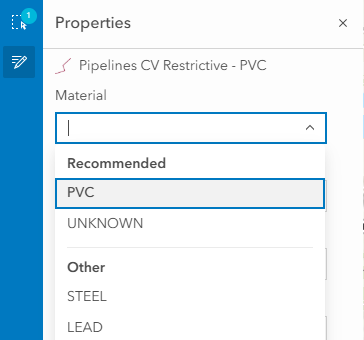
In addition to supporting Contingent Value workflows for individual features, UNE provides support for multi-feature editing where Contingent Value definitions and shared attribute structures allow. This enables users to update common attributes across multiple selected features while continuing to benefit from Contingent Value guidance and validation.
As Contingent Values are dependent on the configuration authored within ArcGIS Pro, the options, recommendations, and validation behaviour presented in UNE will vary according to the rules defined within each dataset.
For more information on creating and managing Contingent Values, see the Esri documentation here.