On this page
Applications in UNE for ArcGIS are capable of editing, capturing and working with Z enabled data.
Z Support
Z support is configured in the Builder Wireframe under the Data tab. By default applications will be Z enabled, however, this setting can be disabled.
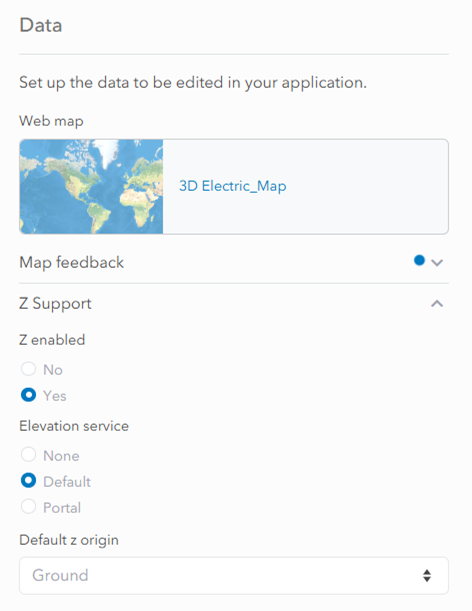
Setting an elevation service
The elevation service allows the application to determine ground height at any location. By default, under the Builder Data tab, the application will use the Portal’s default elevation service. This default service is set under the organisation settings tab of the Enterprise Portal. Selecting the Portal option allows the user to specify a custom elevation service from within the users’ Portal to use within applications.
Setting the elevation service to ‘none‘ will remove the Z origin settings from the Builder and the Client units setting panel. It will also remove the ability to use the locked (level) Z Alignment setting during edits due to the absence of a ground surface.
Default Z Origin
Height reporting can be configured in the Builder to use either Ground-relative or Absolute values. These settings control how Z values are displayed and entered during editing, and users can toggle between them within the application settings menu. It is important to note that the default Z origin is simply how heights are reported within the application and that it is distinct from how values are stored at the database level.
Ground-relative means heights are measured from the terrain surface beneath each feature.
Absolute means heights are measured from a fixed reference, usually mean sea level. This reference is set by the Vertical Coordinate System in the elevation service.
It is recommended that the default Z origin should match the underlying data to avoid confusion. For example, if the data layers contain absolute Z values (Z awareness is set to ‘Absolute height’ in the Data Rules Editor), then it is recommended to set the default Z origin to ‘Absolute’.
Importing existing apps
Existing apps can be imported into Z enabled UNE. Layers in these apps will have their Z awareness default to ‘On the ground‘ in the Data Rules Editor in Builder and so should be updated accordingly.